
PSA Hub: professional services automation on Microsoft Dataverse
Projects, time, expenses and invoicing in one workspace. Built for firms already using Microsoft Dataverse, with your data in your own environment.
€39 per user per month, billed annuallyExcl. VAT. Minimum 15 users. DocGen, implementation and Microsoft licences are additional.
Not Microsoft's Project Service Automation. PSA Hub is a Simple Smooth Safe product. Microsoft's Dynamics 365 Project Service Automation is a different product, and it reached end of support on 31 March 2025 (Microsoft Learn: Project Service Automation end of life).
A closer look at PSA Hub
Real screens from the application, with demo data. Choose a module to explore, and select a screenshot to read it at actual size.
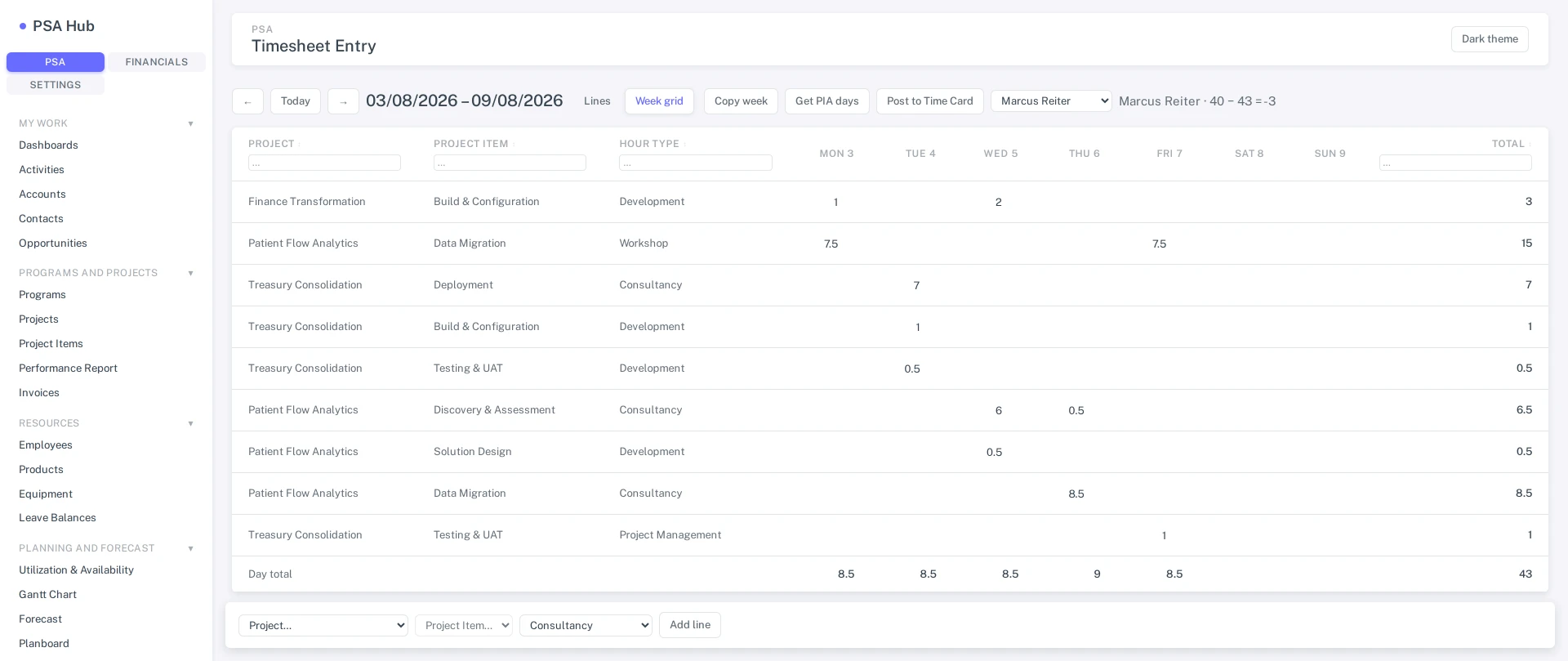
- The week as a grid: project, item and hour type down the side, days across.
- Cells write straight through to psa_hours; approved rows lock.
- The same screen has a line view, copy-week, PIA days and post to time card.
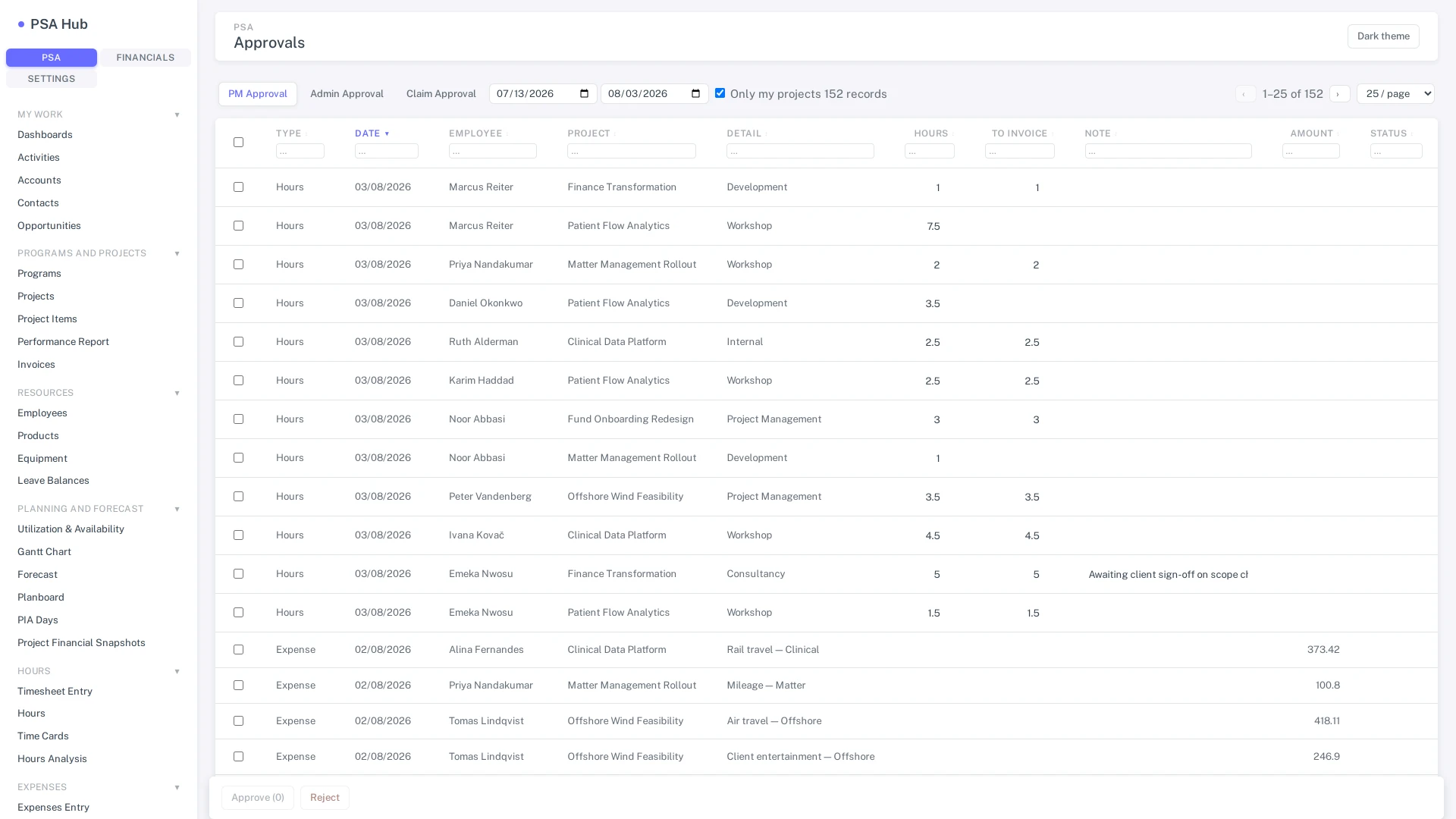
- One screen, not three: hours and expense lines sit in the same queue, with a scope toggle.
- Bulk select, and inline edit of hours, to-invoice and the internal note.
- Rows that can't be approved — on hold, rejected, reallocated — are shown and blocked rather than quietly dropped.
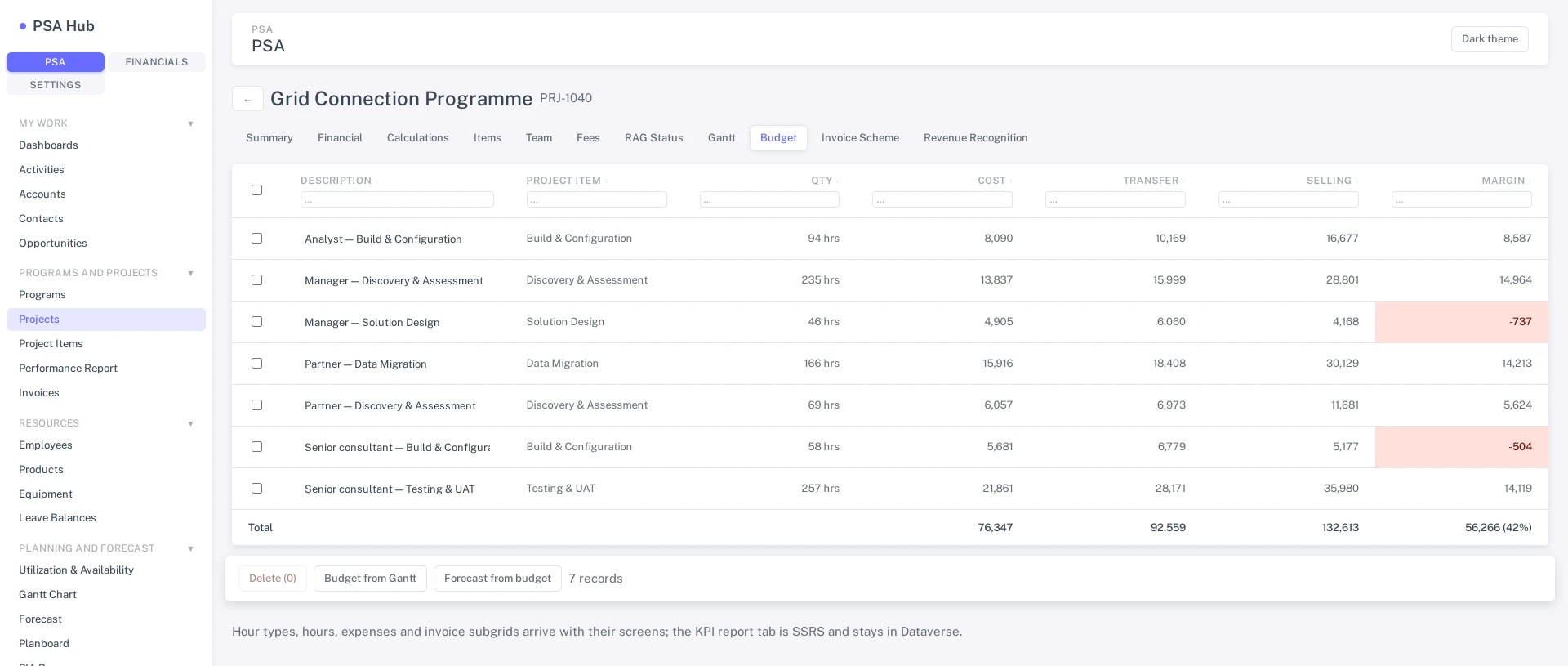
- Summary, Financial, Calculations, Items, Budget, Invoice Scheme and Revenue Recognition are tabs on one screen — not seven form loads.
- Budget lines carry cost, transfer and selling amounts.
- Margin is computed per line, negatives called out, and rolled up to a project total.
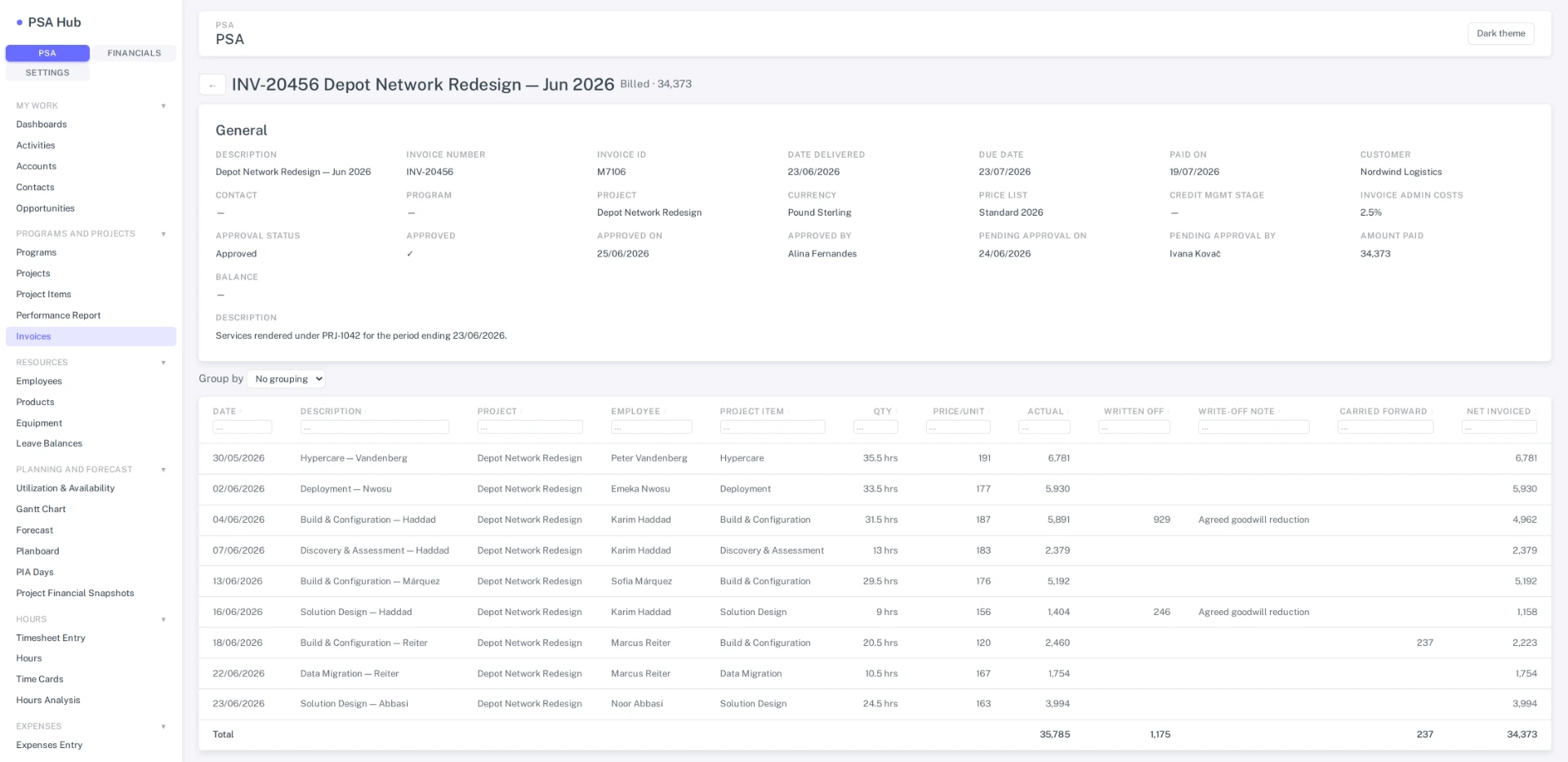
- Invoice lines with write-off reconciliation.
- Net invoiced is actual less write-off less carry-forward, totalled at the foot.
- A write-off entered without a note is flagged rather than accepted.
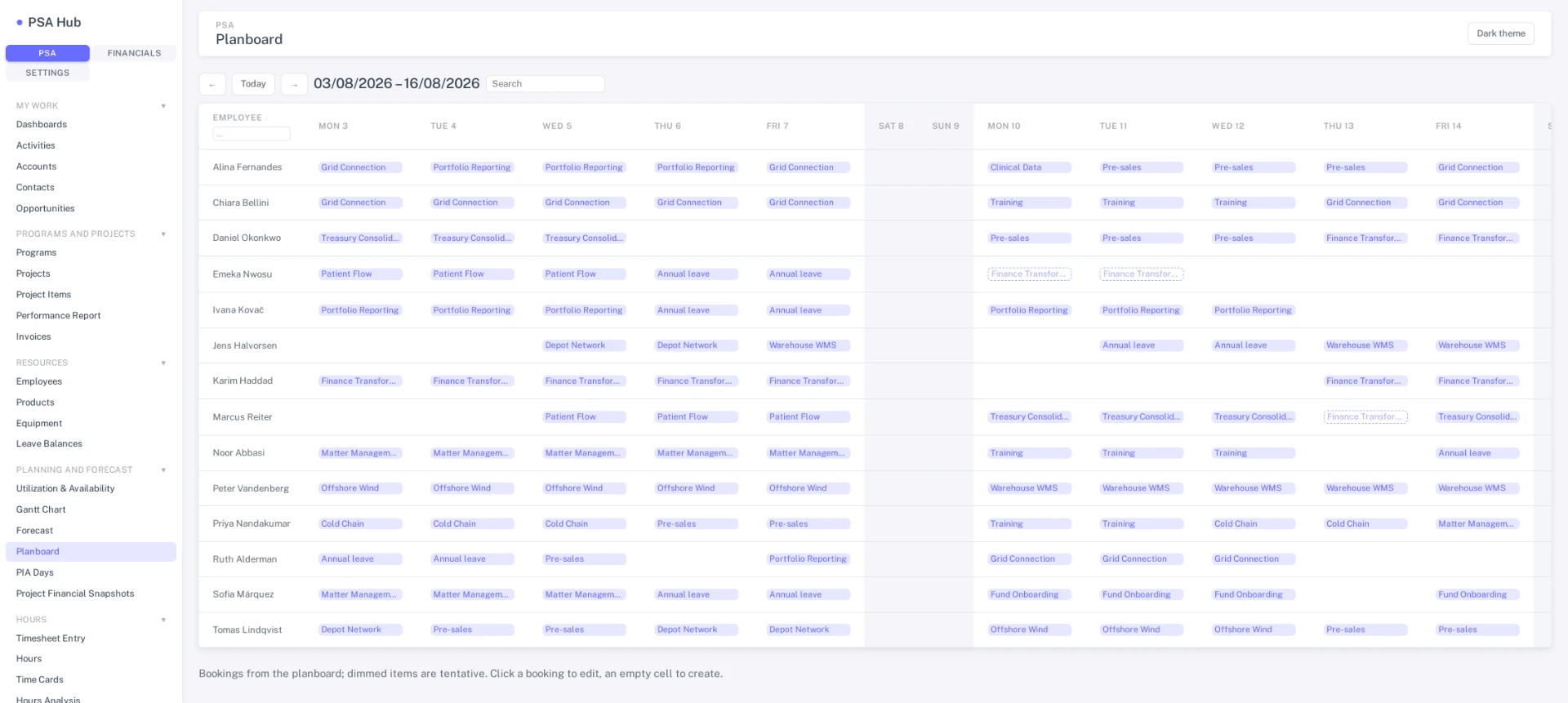
- Who is booked on what, by day, per person and per project.
- Click a booking to edit or delete it, an empty cell to create one.
- Dashed bookings are tentative.
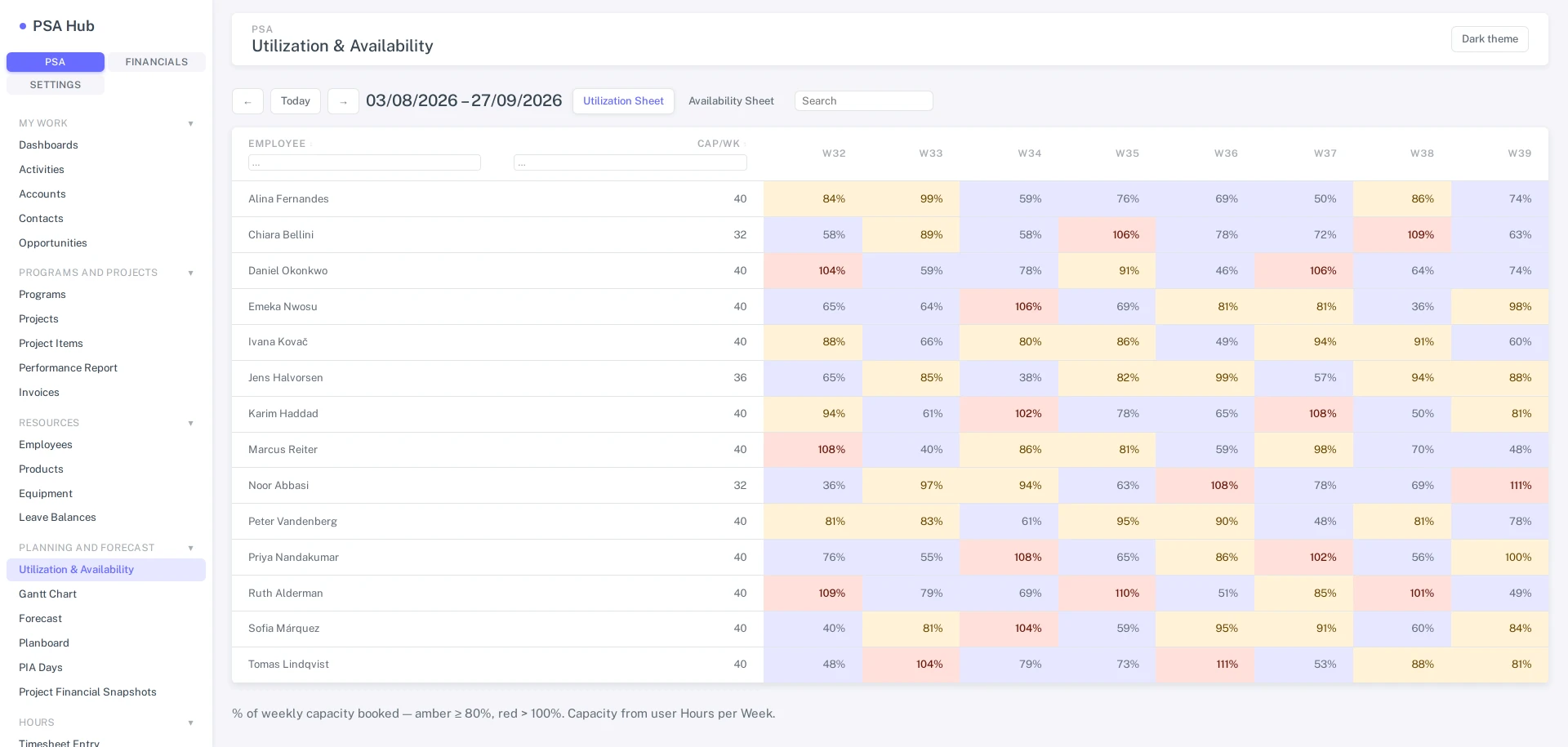
- Booked against contracted capacity, eight weeks out: amber from 80% and red over 100%.
- Capacity comes from psa_hoursperweek.
- The same matrix reads the other way round as availability in hours.
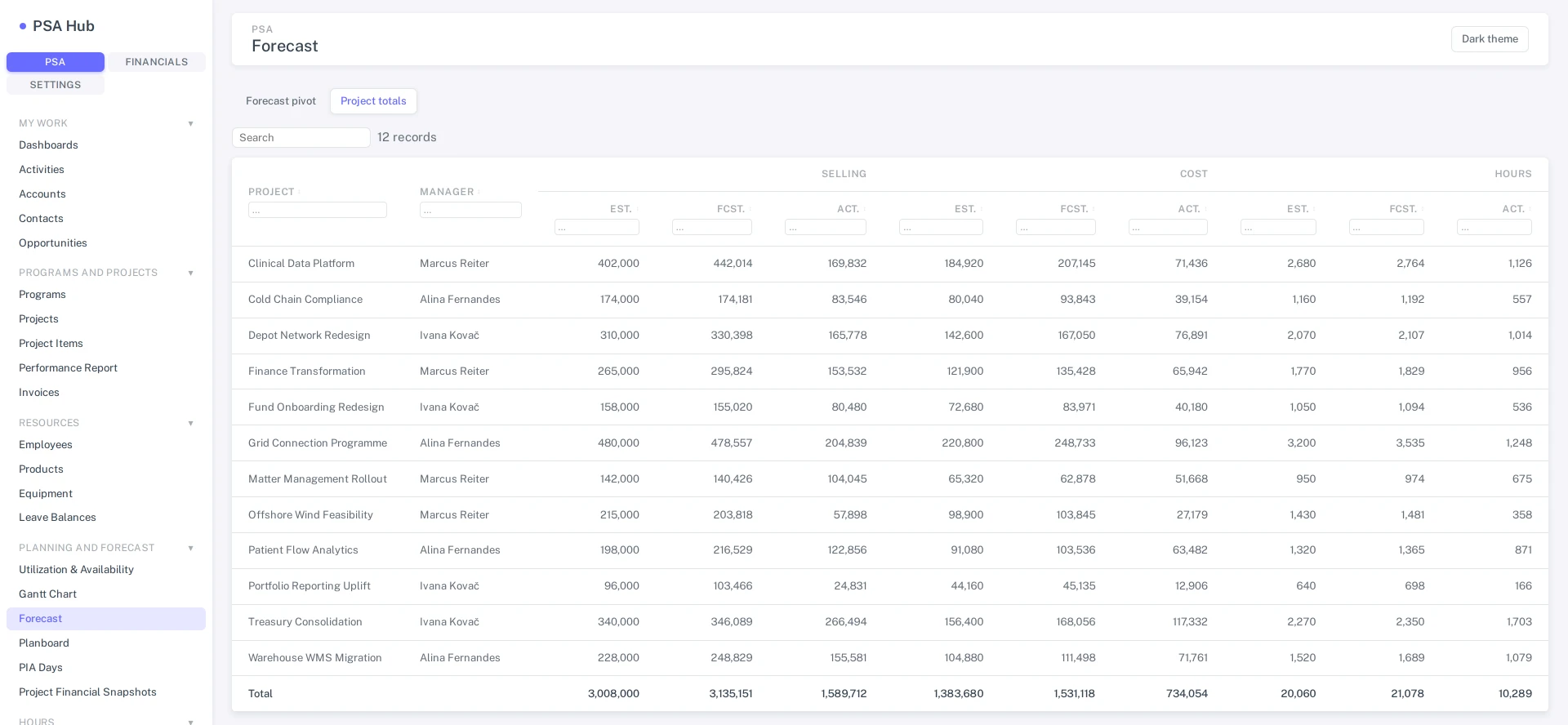
- Estimated, forecast and actual side by side for selling, cost and hours.
- Per project and in total.
- The other tab is the editable pivot over psa_forecastitem, by period.
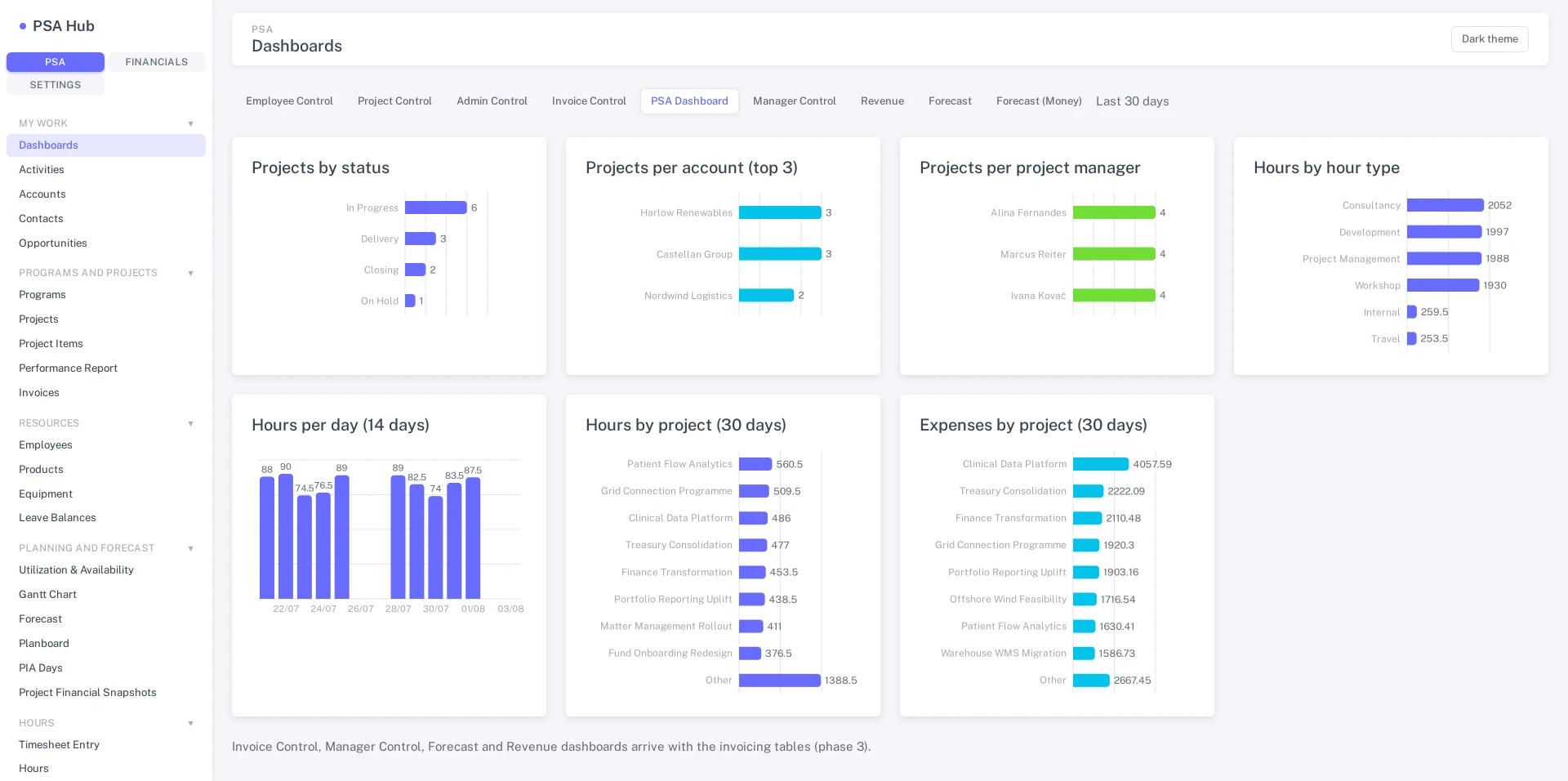
- The model-driven dashboards, ported chart for chart.
- Projects by status, per account and per manager, and hours by type.
- The rolling hours and expenses boards underneath.
Who this is for
PSA Hub is for firms that run their own projects — the practice that bills its own time, on its own clients, in its own tenant. It extends a Microsoft platform investment you have already made, which is where all of its advantages come from, so we'd rather you find out here than in a discovery call.
- Your firm is standardised on Dynamics 365 or Power Platform — it's where your CRM, your security groups, and your admins already are
- You have 15+ billable people whose time turns into invoices
- You want project and billing data in your own tenant, under your own compliance and retention rules — not in a vendor's cloud
- Your IT team would rather administer one more app on a platform they know than one more vendor relationship
- Your firm has no Dynamics 365 or Power Platform footprint — a self-serve PSA tool will genuinely cost you less, and we'll tell you the same on a call
- You're comparing per-seat prices against standalone PSA tools in a spreadsheet — without the Microsoft platform underneath, PSA Hub loses that comparison, by design
- You're planning to "maybe move to Dynamics later" — adopt the platform first, then come back
If you implement PSA for other people, this is not the page you want. The product that matters to an implementation firm is DocGen — the document engine you put inside your own client work. We sell it to you at the same public price as everyone else, you keep the delivery, and we do not chase your clients. The terms are written down on our partners page rather than implied here.
Why not Dynamics 365 Project Operations?
Often you should choose Project Operations: it is Microsoft's own professional services product, backed by Microsoft's support organisation, and the better answer if you are heading for Dynamics 365 Finance or your procurement will only sign with a vendor of Microsoft's size. Choose PSA Hub if your practice lives in a week grid, a planboard, a utilisation matrix and one approvals queue, and you want those built rather than assembled — with one supplier and direct access to the people who write the code. Read the module-by-module comparison of PSA Hub and Dynamics 365 Project Operations.
What PSA Hub replaces
A firm on Dynamics with a standalone PSA tool is really running three systems. PSA Hub removes all three at once.
The separate PSA system
The standalone tool with its own logins, its own admin console, its own renewal, and its own copy of your clients and projects.
The integration to Dynamics
The connector, middleware, or custom sync that ferries accounts, contacts and invoices between the PSA tool and Dataverse — and breaks on every API change at either end.
The reconciliation work
The month-end ritual of explaining why the PSA tool, the CRM and the ledger disagree. One system of record means there is nothing to reconcile.
Why the screens are purpose-built
Why the screens are purpose-built
Model-driven surfaces are excellent at what they're for: a table, a form, a view. A PSA suite is mostly the other thing — a week grid, a planboard, a utilisation matrix, an approval queue. In the legacy product each of those was a custom web resource bolted into the shell, and that is where the cost lived.
- Timesheets, planboard, Gantt and approvals each a separate embedded app
- Three separate vendored ExtJS trees behind them, none of them current
- A full page load between the shell and every custom screen
- Approval views scattered across three screens, each with its own filters
- Commercial grid and scheduler components, licensed per developer
- Client variations made by forking — a fix has to be applied N times, and usually isn't
- One application with client-side routing — no reload between screens
- React 19 + TypeScript on the supported Power Apps code-app runtime
- Approvals is one screen — PM, Admin and Claims, with a scope toggle
- Open-source component stack: TanStack Table, react-router, Recharts
- Typed Dataverse services generated per table — no hand-written fetch
- One codebase for every client; variation is configuration, never a fork
All modules and product boundaries
Modules
Working software, described by what the screens actually do — and most of them have a screenshot above. The recorded walkthrough follows on the scoping call, against your own data rather than a demo tenant.
What ships
one list · every module, every user, one rateWeek grid and line views, copy-week, duplicate, PIA days, post to time card. Cells write straight through to psa_hours, and rows lock once approved. Approvals are one screen — PM, Admin and Claims with a scope toggle, bulk select, inline edit, blocked rows called out.
Line entry, claim creation, receipt upload and download, billable or not. Categories, projects and items resolve as you type rather than through a lookup dialog.
Summary, Financial, Calculations, Items, Budget, Invoice Scheme and Revenue Recognition as tabs on a single screen — not seven form loads. Calculated fields stay read-only; the plugins own them.
Draft invoices from approved time and expense — fixed-price installments or time & materials. Invoice list and detail with write-off reconciliation, AR/AP ageing, and invoice-scheme templates that validate installments to 100%.
Work in progress per project and financial period — WIP invoice and WIP proposal amounts carried in the revenue-recognition period history alongside spent and earned. You enter % complete per project item; the earned and WIP figures follow from it.
Margin per project — selling less cost across budget lines, with a percentage and negative lines called out, rolled up to a project total.
A planboard of who is booked on what, when — per person and per project, with a booking editor that creates, edits and deletes.
Utilisation and availability matrices comparing what's booked against psa_hoursperweek, plus a days mode over psa_piaday for the absence side of the same question.
Revenue forecasts as an editable pivot over psa_forecastitem with anchor dates and a project-totals tab — live projects and budgets, not a spreadsheet copy.
Employee, Project, Admin and Invoice Control boards; a grouped performance report rolling project items up per project and to a grand total; and an hours pivot by project, employee or hour type.
What it does not do
stated here, not discovered in month three- Bookings are not capacity-checked. The planboard will let you book someone who is already full. The utilisation and availability matrices compare booked hours against psa_hoursperweek afterwards, which is a view of the damage, not a check at the moment you book. No date for changing that.
- There is no forward-looking utilisation forecast. Forecasting is revenue: an editable pivot over psa_forecastitem and a project-totals tab. Projected utilisation — what the bench looks like in nine weeks against work not yet booked — does not exist, and has no date.
- Margin is per project only. It is computed over the project's budget lines. There is no margin per client and none per person, so the two questions "which client is worth having" and "who earns their rate" are not ones this software answers today. No date.
- Billing stops at write-off reconciliation. You draft invoices from approved time and expense, reconcile write-offs and carry-forwards, and age AR/AP. Invoice lines are read-only at that point, there is no posting to a ledger, and no off-the-shelf accounting connector ships — every accounting integration is built and tested inside the implementation.
- Gantt is read-only bars, and we do not sell it. It renders; it does not plan. It is not in the module list above because it is not a module you are paying for.
- Four dashboards ship. Employee, Project, Admin and Invoice Control. The rest of the legacy chart set has not been ported, and the performance report and hours analysis cover most of what those charts were used for.
Deployment and updates
How it reaches your environment
PSA Hub ships as a managed solution — standard Dataverse ALM, nothing bespoke. Inside it are the tables, the security roles, the server-side plugins, and the app surfaces themselves, including a compiled React front end that the Power Apps platform hosts, authenticates and governs. You import one solution; your admins already know how.
// what we run — the TypeScript source stays in our repo
▸ npm run build          Vite bundle  // React 19 + TypeScript
▸ power-apps push        bundle → the PSAHub solution, dev environment
▸ export managed         the managed .zip // this is the deliverable

// what you import — one solution, everything in it
▸ tables + option sets   psa_ schema, 87 registered entities
▸ security roles         privilege-trimmed, mirrored from the sitemap
▸ plugin assemblies      pricing, posting, approval rules // server-side
▸ the app surfaces       3 areas · 14 navigation groups

// at runtime, on the platform you already run
▸ Entra ID               platform sign-in  // no token plumbing of ours
▸ Dataverse Web API      typed services, one per table
▸ DLP + sharing          enforced by the platform, not by our solution
▸ psa_ plugins           every rule that must not be bypassable
What runs in production today
There is no public customer reference for PSA Hub yet — no named client, logo or case study — and we will publish one only when a customer agrees to be named. The screenshots on this page come from the running build on a seeded demo tenant, with invented data. What you can check instead: on a scoping call we run those same screens against your own data.
Pricing
One price. €39 per user per month, billed annually, minimum 15 users — every module, for every user. There is no tier to choose and nothing held behind a higher rate. Two other lines sit next to it and both are named here: DocGen, which PSA Hub requires, and implementation, which is scoped and quoted before you commit to anything.
- Minimum 15 users
- Every module: time, expense, projects, billing, WIP, profitability, resourcing, utilisation, forecasting, analysis
- No tier, no per-module upsell, no premium seat
- Billed annually, in your own tenant
- PSA Hub renders invoices, statements and engagement documents through DocGen — it is a prerequisite, not an add-on you can decline
- Priced per production environment, not per user
- Public price, the same one anyone pays: see the DocGen rate card for deployment and template rates
Why two different units: we charge for what drives the cost. DocGen is an engine. It sits in one environment and does the same work whether one person triggers it or four hundred do, so charging per user would be charging for something that does not vary — it is priced per environment. PSA Hub is an application people are inside all day. More users is more configuration, more onboarding, more support and more of everything we have to keep working, so it is priced per user. Neither number is a lever on the other, and neither is a discount on the other.
—
Year 1 estimate, excl. VAT
- PSA Hub licence: 40 users × €468
- €18,720
- DocGen licence, required: one production environment
- €7,500
- Implementation, fixed price quoted after scoping: from
- €18,000
- Year 1, from
- €44,220
Estimate: €18,720 + €7,500 + €18,000 = €44,220. Implementation is quoted after scoping and starts at €18,000; each further DocGen production environment adds €7,500 a year. Microsoft licences and Dataverse capacity are not included. The DocGen rate card also lists deployment and onboarding at €5,500 for the first environment; ask us how it applies alongside a PSA Hub implementation.
- €39 per user, per month, billed annually. Minimum 15 users. Below that the implementation can't earn its keep — see the fit section above.
- DocGen is a prerequisite, billed separately at €7,500 per production environment per year. There is no combined rate and no cross-product discount: you pay the public DocGen price, and it is the same price whether or not you also run PSA Hub.
- Annual billing. A PSA rollout is an operating decision, not a monthly experiment, and the price is set accordingly.
- Implementation is quoted separately, from €18,000. Scoped before contract — what drives it is below.
What shapes your implementation quote
Implementation
A PSA rollout is a business-process change, not an app install. Every engagement is scoped up front and quoted as a fixed price — engagements start at €18,000, and the number is driven by four things we'll measure with you before quoting:
Headcount
Users to onboard and train, and the billable / support split — it sets configuration and training effort.
Accounting system
Which ledger you run and whether PSA Hub should feed it. Every accounting integration is custom-built and tested within the engagement — the single biggest scope driver.
Data migration volume
How many years of projects, time and rate history come across, and from what system — clean sources migrate cheap, spreadsheets don't.
Integration count
Every system beyond accounting that must send or receive PSA data — payroll, HR, BI — is scoped and priced per integration.
Why we won't publish a fixed implementation price: an underscoped PSA rollout fails at month-end, and month-end is the one deadline a professional services firm cannot move. Scoping first is how we make sure the number we quote is the number you pay.
Data ownership and leaving the product
How you leave
Anyone buying a system their invoicing depends on should ask how they get out of it before they get into it. PSA Hub has an unusually good answer to that, and it is not a promise about our conduct — it is a consequence of where the data sits. Your project, time, expense, invoice, booking and forecast records are native Dataverse tables in your own tenant, in your own environment, from the first day. We never hold a copy.
Where the data is
In your Dataverse environment, in the psa_ schema — 87 registered entities, plus your reference data, your configuration, and any custom columns or option sets you added. Documents PSA Hub generates land wherever your tenant already puts documents. Nothing lives in a vendor cloud, so there is nothing to repatriate.
How you take it out
With the same Dataverse tooling you already own and already use — the platform's own export, Synapse Link or Fabric, dataflows, the Web API, your ALM pipeline. The format is Dataverse tables and standard column types, not an export format of ours, so there is nothing proprietary to convert. There is no request to raise with us and no ticket to open, at any point, in or out of contract.
What ends, what stays
What ends is the licence to run the application code: you uninstall the managed solution, which uninstalls cleanly. What stays is the data and the schema underneath it, including the customisations you made on the Dataverse side, because those were always yours. You can be running your own reports off those tables the day after the subscription ends.
What it costs
Nothing, for the mechanism itself — there is no exit fee and no extraction charge, because there is no extraction to do. For 30 days after a subscription ends we answer questions about extracting configuration and about what to remove, at no charge. A longer transition — migration help, rebuilding somewhere else — is a quoted Services engagement. The binding wording is in Cancellation & Refunds, not on this page.
Questions buyers actually ask
Is this a canvas app?
No. PSA Hub is native Dataverse tables with model-driven surfaces over them, plus a compiled React front end delivered as a Power Apps code app. You get real application code where a canvas app would give you Power Fx, and purpose-built screens where a form designer would give you forms.
What happens to our existing model-driven app?
It keeps working. Everything runs over the same tables, so a pilot group can move to the new screens while everyone else stays put, and you cut over per team rather than per tenant. Nothing forces a big-bang switch.
Do we lose our customizations?
Custom columns, option sets, and plugins are all Dataverse-side — they survive, because PSA Hub reads the same schema. What doesn't carry over is form layout, which is usually the part you were customizing to work around the form designer in the first place.
Can our partner extend it?
Through sanctioned layers — configuration data, custom columns, navigation slots, and Custom API hooks — never by forking the source. That constraint is the product: it's what keeps one fix reaching every client instead of N drifted copies.
Does it work on a phone?
It's responsive and usable on a tablet, and time and expense entry are the screens designed for a small viewport. There is no offline mode — it needs a connection, same as any Power Apps surface.
Who holds the source?
We do, and there is a mechanism for the case where that stops being safe for you. You receive a managed solution containing the compiled app, the tables, the roles and the plugins — the standard Power Platform deliverable — and your data and configuration are yours throughout. Your agreement establishes a source escrow at signature, on the terms set out on our partners page: it triggers on insolvency, on death or incapacity, or on 12 months without a release, and on a trigger you receive an irrevocable perpetual licence to the source and can maintain the software yourself. The triggers and the exact wording are there rather than restated here.
Why not Dynamics 365 Project Operations?
Often you should choose it — it is Microsoft's own product, with Microsoft's support organisation behind it and partners in every market. The honest split is above, and the module-by-module comparison is in Insights.
How do we get our data out?
You don't get it out of us, because we never hold it — it is Dataverse tables in your own tenant, exportable with your own tooling, in or out of contract. The mechanism, the scope and the cost are set out above.
Start the scoping conversation
Implementation is quoted, not listed, and four things drive the number — headcount, your ledger, migration volume and integration count. Send us those and we can tell you the range before you spend a call finding it out.
Billable headcount, which accounting system you run, how many years of history would migrate, and what else needs to exchange data with PSA Hub. If PSA Hub isn't right for your firm, we'll say so in the reply.
Runs in your tenantData Processing AgreementSecurity overview
- Controller. Simple Smooth Safe, Unipessoal Lda., Rua Retiro dos Pacatos 50, Ed. Startup, Sala 9, 2635-224 Rio de Mouro, Portugal. NIF/VAT PT518264742. Questions or requests: info@simplesmoothsafe.com.
- What we hold. Your name, email address, whatever you chose to tell us about your organisation, and the correspondence itself.
- Purpose. To answer you, and to follow up on the specific thing you asked about.
- Legal basis. Legitimate interest (Art. 6(1)(f)) in responding to an enquiry you initiated, or steps prior to entering a contract (Art. 6(1)(b)) where you are asking to buy.
- Retention. Up to 24 months after our last exchange, then deleted — unless you become a customer, in which case section 1.4 applies.
- Your rights. Ask for access, correction or deletion, or object, at any time by emailing us. Full detail in the Privacy Policy, section 1.2.
- Controller. Simple Smooth Safe, Unipessoal Lda., Rua Retiro dos Pacatos 50, Ed. Startup, Sala 9, 2635-224 Rio de Mouro, Portugal. NIF/VAT PT518264742. Questions or requests: info@simplesmoothsafe.com.
- Where it goes. The form is hosted on Microsoft Forms. It collects your name, work email, company, tenant or environment details, and whether you are a partner or an end client.
- Purpose. To contact you about the product you asked about — early access, availability, or a demo. That is the only thing it is used for.
- Legal basis. Consent (Art. 6(1)(a)), given by ticking the box on the form.
- Retention. Until you withdraw consent, or until the programme you signed up for closes, whichever is first.
- Withdrawing. Email us. No reason needed, no effect on anything else, and no retention "for our records". Full detail in the Privacy Policy, section 1.3.
Prefer email? info@simplesmoothsafe.com reaches the same place, under section 1.2 of the Privacy Policy.